
Guide
Ransomware, and backups that actually survive it
How this page is funded
veratis.online is funded by affiliate commission earned on partner links elsewhere on this site. This guide contains no commercial links and recommends no product. Our funding and independence rules are set out in the editorial policy.
The picture most people have of ransomware — you click something, your files lock — leaves out the part that decides whether you lose your data. By the time the ransom note appears, your backups have usually already been dealt with.
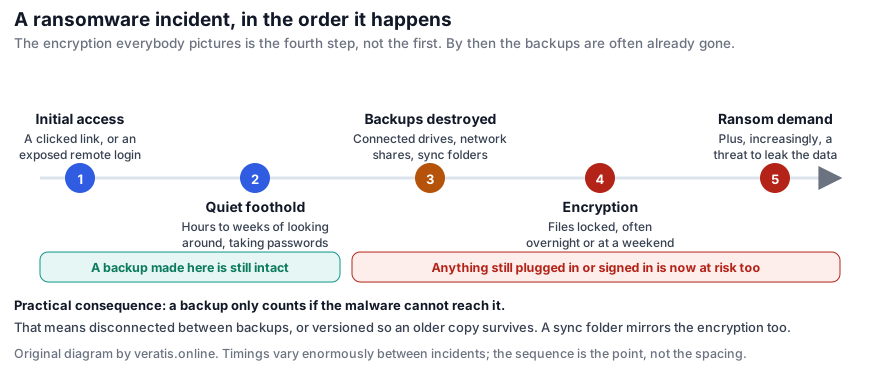
The sequence, and why it matters
- Initial access. A clicked attachment, a stolen password reused from a breached site, or a remote-access service exposed to the internet.
- A quiet period. Hours on a home machine, often weeks on a business network. The attacker looks around, collects credentials and works out what you have. Nothing visible happens.
- Backups are dealt with. Deliberately and first. Connected external drives, network shares, the Windows shadow copies that would let you roll back, and cloud sync folders which are simply folders from the malware's point of view.
- Encryption. Usually launched at night or at a weekend, to maximise the time before anyone notices.
- The demand — increasingly combined with a threat to publish data stolen during step two, so that paying for a decryption key does not end the problem.
Step three is the whole reason this guide exists. Antivirus software addresses steps one and four. Nothing addresses step three except having a copy the attacker could not reach.
What is not a backup
- An external drive that lives plugged in. It is a mounted volume. It will be encrypted along with everything else, and it is the single most common reason home users lose everything despite “having a backup”.
- A sync folder, on its own. OneDrive, Dropbox, Google Drive and iCloud Drive propagate changes. Encrypted files are changes. They sync the damage, promptly. (Most of these services do keep version history, which can rescue you — see below — but syncing is not the backup; the versioning is.)
- A second folder on the same disk. Protects against your own mistakes and nothing else.
- A RAID array. Protects against a drive failing. It will mirror the encryption perfectly.
- A backup you have never restored from. Untested backups fail at a remarkable rate: wrong folders included, silently broken for months, encrypted with a passphrase nobody wrote down.
What does survive
Two properties matter. A backup needs to be unreachable from the infected machine, or immutable so that older versions cannot be altered or deleted. Ideally both.
- A drive that is disconnected between backups. Low-tech and extremely effective: plug it in, run the backup, unplug it, put it away. Malware cannot encrypt a drive that is in a drawer.
- Two drives, rotated. One in use, one elsewhere — ideally in a different building, which also covers fire and theft.
- A backup service with versioning and its own credentials. Not a sync folder: a backup product that keeps dated historical versions you can restore from, and that is not simply writable by whatever is running on your computer.
- Cloud version history, as a partial safety net. The major consumer sync services keep previous versions for a period — typically 30 days — and several offer a bulk “restore files to a point in time” function specifically for this case. Worth knowing about, not worth relying on as your only measure, since the window is limited and recovery of a large library is slow.
The 3-2-1 rule, which is still the right answer
Three copies of anything you care about, on two different kinds of media, with one kept off-site. For a home machine that usually means: the live copy on your computer, a copy on an external drive kept disconnected, and a copy in a versioned cloud backup. The rule predates ransomware by decades and handles it anyway, because it was designed around the assumption that any single copy can be lost.
A routine for one home computer
- Decide what actually matters. Usually a short list: documents, photos, tax and legal records, project files, password vault export. The operating system and applications are reinstallable and do not need backing up.
- Turn on the built-in tool for the fast, local copy. Time Machine on macOS, File History on Windows, to an external drive. This is your convenience layer: it handles the far more common case of a deleted file or a dead disk.
- Add a versioned off-site copy. Either a backup service with history, or a second external drive stored somewhere else and refreshed on a schedule you will actually keep — monthly that happens beats weekly that does not.
- Disconnect the local drive when the backup finishes. The single highest-value habit in this list.
- Encrypt the drives. BitLocker or FileVault, or your backup tool's own encryption. A backup drive is a complete copy of your life in a format that walks out of a building easily. Write the recovery key down and keep it somewhere that is not the computer.
- Test a restore twice a year. Pick a few real files, restore them somewhere else, open them. Put a reminder in your calendar. This is the step everyone skips and the one that determines whether any of the preceding steps mattered.
If it has already happened
- Disconnect the machine from the network — unplug the cable, turn off Wi-Fi — to stop it reaching shares and other devices.
- Do not plug in your backup drive to see whether it is intact. If the machine is still compromised, that is how you lose the backup too.
- Photograph the ransom note and keep a sample encrypted file. Both help with identification.
- Check whether a free decryptor exists. The No More Ransom project, run by Europol and partners, maintains a free tool collection and an identification service covering many families — nomoreransom.org.
- Report it to your national police or cybercrime reporting point. Reporting feeds the investigations that produce those decryptors.
- Rebuild rather than clean. Wipe the machine and reinstall. Restore data from backup, not system state.
- Assume your passwords were taken during step two, and change the important ones from a different, clean device.
On whether to pay: law enforcement across the EU advises against it. There is no guarantee of a working key, it funds the next attack, and where data was also stolen it does not remove the threat of publication. That advice is easy to give and hard to follow when the data is irreplaceable — which is the argument for doing the unglamorous work above beforehand.
Sources and further reading
- No More Ransom — free decryption tools and ransomware identification, a joint initiative of Europol, the Dutch National Police and industry partners — nomoreransom.org
- ENISA Threat Landscape, ransomware chapter — enisa.europa.eu
Written by Linda Jones for veratis.online. If you spot an error, please write to info@veratis.online — see the corrections procedure. Where this guide and a vendor’s own published information diverge, the vendor’s information prevails.